Quick Notes Overview
When working in SharePoint, you may want to capture ideas, reminders, or other information without leaving the page and losing context. You don't want to build a separate storage service, instead of you want to reuse something that already exists, ideally something that is already available in Microsoft 365. Outlook Notes are a lightweight, personal storage option that can be accessed through Microsoft Graph, making them a great choice for this scenario.
Microsoft Graph represents each quick note as a note resource stored in the user’s Outlook Notes folder. Because Microsoft Graph provides a single API for creating, reading, updating, deleting, and synchronizing these notes, they can be surfaced consistently in custom experiences across SharePoint and other Microsoft 365 applications. Notes support HTML or text content, categories, previews, inline images, and change tracking, making them a lightweight and practical choice for capturing information without introducing a separate storage service.
Prerequisites
You need a SharePoint Online tenant, an account that can use Outlook notes, and a supported development environment. This article targets SPFx 1.22.2, Node.js 22 LTS, and React 17.0.1.
At the time of writing, Microsoft marks the new SPFx CLI as a prerelease tool. Check the current SPFx development environment guidance before using it for a production project.
Install the SPFx CLI through npm:
npm install -g @microsoft/spfx-cli
spfx --version
Create a new SPFx project using the following command:
SPFx create --template extension-application-customizer \
--library-name quick-notes \
--component-name "Quick Notes" \
--target-dir "{path_to_folder}\\spfx-quick-notes\\"
SPFx has strict toolchain requirements. Use a supported Node.js 22 LTS release and React 17.0.1 for SPFx 1.22.2.
Go to the target directory and update package.json with the required dependencies:
{
  "name": "quick-notes",
  "version": "0.0.1",
  "private": true,
  "engines": {
    "node": ">=22.14.0 < 23.0.0"
  },
  "scripts": {
    "build": "heft test --clean --production && heft package-solution --production",
    "start": "heft start --clean",
    "clean": "heft clean",
    "eject-webpack": "heft eject-webpack"
  },
  "dependencies": {
    "@microsoft/decorators": "1.22.2",
    "@microsoft/sp-application-base": "1.22.2",
    "@microsoft/sp-core-library": "1.22.2",
    "@microsoft/sp-dialog": "1.22.2",
    "@microsoft/sp-http": "1.22.2",
    "@tiptap/extension-image": "^3.31.4",
    "@tiptap/extension-link": "^3.31.4",
    "@tiptap/react": "^3.31.4",
    "@tiptap/starter-kit": "^3.31.4",
    "dompurify": "^3.4.16",
    "react": "17.0.1",
    "react-dom": "17.0.1",
    "tslib": "2.3.1"
  },
  "devDependencies": {
    "@microsoft/eslint-config-spfx": "1.22.2",
    "@microsoft/eslint-plugin-spfx": "1.22.2",
    "@microsoft/sp-module-interfaces": "1.22.2",
    "@microsoft/spfx-web-build-rig": "1.22.2",
    "@rushstack/eslint-config": "4.6.4",
    "@rushstack/heft": "^1.2.7",
    "@types/heft-jest": "^1.0.6",
    "@types/webpack-env": "~1.15.2",
    "@typescript-eslint/parser": "8.48.1",
    "eslint": "8.57.1",
    "typescript": "~5.8.3"
  }
}
Install the dependencies by running npm install in the target directory.
Request Microsoft Graph permissions
The Notes API requires the delegated ShortNotes.ReadWrite permission to list, create, and update the signed-in user's notes. Add the following entry to the webApiPermissionRequests array in config/package-solution.json:
"webApiPermissionRequests": [
  {
    "resource": "Microsoft Graph",
    "scope": "ShortNotes.ReadWrite"
  }
]
After you deploy the package, a SharePoint or Microsoft 365 administrator must approve this permission request in the SharePoint admin center. The extension cannot call /me/notes until approval is granted. For more information, see the Microsoft Graph Notes API documentation.
Create the Application Customizer
Go to src\extensions\quickNotesApplicationCustomizer\ and update the generated QuickNotesApplicationCustomizer.ts file.
export default class QuickNotesApplicationCustomizer
  extends BaseApplicationCustomizer<IQuickNotesApplicationCustomizerProperties> {
  private _placeholder: PlaceholderContent | undefined;
  private _root: HTMLElement | undefined;
  private _service: NotesService | undefined;
  private _disposed: boolean = false;
  private _missingLogged: boolean = false;
  private _themeProvider: ThemeProvider | undefined;
  private _theme: IReadonlyTheme | undefined;

  public onInit(): Promise<void> {
    Log.info(LOG_SOURCE, 'Initializing QuickNotesApplicationCustomizer');
    initializeIcons();
    this._service = new NotesService(() => this.context.msGraphClientFactory.getClient('3'));
    this._themeProvider = this.context.serviceScope.consume(ThemeProvider.serviceKey);
    this._theme = this._themeProvider.tryGetTheme();
    this._themeProvider.themeChangedEvent.add(this, this._themeChanged);
    this.context.placeholderProvider.changedEvent.add(this, this._render);
    this._render();
    return Promise.resolve();
  }

  private _render(): void {
    if (this._disposed || this._placeholder || !this._service) return;
    this._placeholder = this.context.placeholderProvider.tryCreateContent(
      PlaceholderName.Top, { onDispose: () => this._releaseView() }
    );
    if (!this._placeholder) {
      if (!this._missingLogged) Log.warn(LOG_SOURCE, 'The Top placeholder is not available on this page.');
      this._missingLogged = true;
      return;
    }
    this._missingLogged = false;
    this._root = this._placeholder.domElement;
    this._renderView();
  }

  private _themeChanged(args: ThemeChangedEventArgs): void {
    this._theme = args.theme;
    this._renderView();
  }

  private _renderView(): void {
    if (!this._root || !this._service || this._disposed) return;
    ReactDOM.render(React.createElement(QuickNotes, {
      service: this._service,
      buttonLabel: this.properties.buttonLabel,
      theme: this._theme ? createTheme({
        palette: this._theme.palette,
        semanticColors: this._theme.semanticColors,
        isInverted: this._theme.isInverted
      }) : undefined
    }), this._root);
  }

  private _releaseView(): void {
    if (this._root) ReactDOM.unmountComponentAtNode(this._root);
    this._root = undefined;
    this._placeholder = undefined;
  }

  public onDispose(): void {
    this._disposed = true;
    this.context.placeholderProvider.changedEvent.remove(this, this._render);
    this._themeProvider?.themeChangedEvent.remove(this, this._themeChanged);
    const placeholder = this._placeholder;
    this._releaseView();
    placeholder?.dispose();
  }
}
The onInit method initializes the extension, sets up the theme provider, and renders the view. The _render method creates a placeholder for the extension and renders the QuickNotes component. The _themeChanged method updates the theme when it changes, and the _releaseView method cleans up the view when the extension is disposed.
Create new subfolders components and services under src\extensions\quickNotesApplicationCustomizer\. Add the NotesService to the services folder and the QuickNotes component to the components folder.
The NotesService class implements the INotesService interface and provides methods to interact with the Microsoft Graph API for managing notes. It includes methods for listing notes, retrieving a specific note, fetching inline images, creating a new note, and updating an existing note.
export default class NotesService implements INotesService {
  private readonly _getClient: () => Promise<Pick<MSGraphClientV3, 'api'>>;

  public constructor(getClient: () => Promise<Pick<MSGraphClientV3, 'api'>>) {
    this._getClient = getClient;
  }

  public async list(nextLink?: string): Promise<INotePage> {
    const client = await this._getClient();
    const request = client.api(nextLink ? continuation(nextLink, '/me/notes') : '/me/notes').version('v1.0');
    if (!nextLink) {
      request.select('id,subject,bodyPreview,lastModifiedDateTime,categories')
        .orderby('lastModifiedDateTime desc').top(20);
    }
    const response: unknown = await request.get();
    const page = collection(response);
    return { notes: page.items.map(summary), nextLink: page.nextLink };
  }

  public async get(id: string): Promise<INote> {
    const client = await this._getClient();
    const response: unknown = await client.api(notePath(id)).version('v1.0').get();
    return fullNote(response);
  }

  public async images(id: string): Promise<IInlineImage[]> {
    const client = await this._getClient();
    const path = `${notePath(id)}/attachments`;
    const images: IInlineImage[] = [];
    const seen = new Set<string>();
    let next: string | undefined = path;
    while (next) {
      if (seen.has(next)) throw new NotesResponseError();
      seen.add(next);
      const response: unknown = await client.api(next).version('v1.0').get();
      const page = collection(response);
      for (const item of page.items) {
        if (!isRecord(item)) throw new NotesResponseError();
        if (item.isInline !== true) continue;
        images.push({
          contentId: readString(item.contentId),
          contentType: readString(item.contentType),
          contentBytes: readString(item.contentBytes)
        });
      }
      next = page.nextLink ? continuation(page.nextLink, path) : undefined;
    }
    return images;
  }

  public async create(subject: string, html: string, categories: string[] = []): Promise<INote> {
    const client = await this._getClient();
    const response: unknown = await client.api('/me/notes').version('v1.0')
      .post({ subject, body: { contentType: 'html', content: html }, categories });
    return fullNote(response);
  }

  public async update(note: INote, changes: INoteChanges): Promise<INote> {
    if (!note.changeKey || (!changes.body && changes.subject === undefined && changes.categories === undefined)) {
      throw new NotesResponseError();
    }
    const client = await this._getClient();
    const response: unknown = await client.api(notePath(note.id)).version('v1.0')
      .header('If-Match', `"${note.changeKey}"`)
      .patch(changes);
    return fullNote(response);
  }
}
MSGraphClientV3 obtains a Microsoft Graph client for the signed-in user and handles authentication. The API call still requires the ShortNotes.ReadWrite permission requested by the SPFx package and approved by an administrator.
The QuickNotes component is a React component that renders the UI for the Quick Notes extension. It includes a button to open the notes panel and handles keyboard shortcuts for accessibility.
export default function QuickNotes(props: IQuickNotesProps): JSX.Element {
  const [open, setOpen] = React.useState(false);
  const button = React.useRef<IButton>(null);
  const label = props.buttonLabel || strings.Title;

  React.useEffect(() => {
    const onKeyDown = (event: KeyboardEvent): void => {
      if (event.altKey && event.shiftKey && !event.ctrlKey && !event.metaKey && event.code === 'KeyN') {
        event.preventDefault();
        setOpen(true);
      }
    };
    document.addEventListener('keydown', onKeyDown);
    return () => document.removeEventListener('keydown', onKeyDown);
  }, []);

  const close = (): void => {
    setOpen(false);
    // Defer until the panel has released its focus trap.
    window.setTimeout(() => button.current?.focus(), 0);
  };

  return <ThemeProvider theme={props.theme} className={styles.header}>
    <TooltipHost content={`${label} (${strings.OpenShortcut})`}>
      <IconButton componentRef={button} className={styles.launcher} iconProps={{ iconName: 'QuickNote' }}
        ariaLabel={label} aria-haspopup="dialog" aria-expanded={open}
        aria-keyshortcuts="Alt+Shift+N" onClick={() => setOpen(true)} />
    </TooltipHost>
    {open && <NotesPanel service={props.service} onClose={close} />}
  </ThemeProvider>;
}
The NotesPanel component is a React component that renders the panel for managing notes. It includes functionality for listing notes, filtering by category, searching, creating new notes, editing existing notes, and saving changes. It also handles error messages, success messages, and confirmation dialogs for unsaved changes.
export default function NotesPanel(props: INotesPanelProps): JSX.Element {
  const [notes, setNotes] = React.useState<INoteSummary[]>([]);
  const [nextLink, setNextLink] = React.useState<string>();
  const [edit, setEdit] = React.useState<IEditState>();
  ...
  const knownCategories = React.useMemo(() => {
    const names: string[] = [];
    for (const note of notes) {
      for (const name of note.categories) {
        if (names.every((existing) => existing.toLocaleLowerCase() !== name.toLocaleLowerCase())) names.push(name);
      }
    }
    return names.sort((a, b) => a.localeCompare(b));
  }, [notes]);

  const finishRequest = (token: number): void => {
    ...
  };

  const clearEditor = (): void => {
    ...
  };

  const protectDraft = (action: () => void): void => {
    ...
  };

  const refresh = async (more: boolean = false): Promise<void> => {
    ...
  };

  const load = async (id: string): Promise<void> => {
    ...
  };

  const newNote = (): void => {
    ...
  };

  const save = async (): Promise<void> => {
    ...
  };

  const discard = (): void => {
    ...
  };
  const cancelDiscard = (): void => {
    ...
  };
  const returnToList = (): void => {
    ...
  };
  const reloadNote = (): void => protectDraft(() => {
    ...
  });
  const clearFilters = (): void => {
    ...
  };

  ...

  const renderList = (): JSX.Element => <div ref={listRoot}>
    <div className={styles.listToolbar}>
      <PrimaryButton text={strings.NewNote} iconProps={{ iconName: 'Add' }} disabled={busy} onClick={newNote} />
      <SearchBox className={styles.search} placeholder={strings.SearchNotes} ariaLabel={strings.SearchNotes}
        value={query} onChange={(_event, value) => setQuery(value || '')} disabled={!loaded} />
      <TooltipHost content={strings.Refresh}>
        <IconButton iconProps={{ iconName: 'Refresh' }} ariaLabel={strings.Refresh} disabled={busy} onClick={() => {
          setSuccess('');
          refresh().catch((failure) => setError(reportError(failure)));
        }} />
      </TooltipHost>
      {busy && loaded && !loadingMore && <Spinner size={SpinnerSize.small} ariaLabel={strings.Loading} />}
    </div>
    {!!knownCategories.length && <div className={styles.filters} role="group" aria-label={strings.FilterByCategory}>
      {[undefined, ...knownCategories].map((name) => <button type="button" key={name || ''}
        className={styles.pill} aria-pressed={categoryFilter === name}
        onClick={() => setCategoryFilter(categoryFilter === name ? undefined : name)}>
        {name || strings.AllCategories}
      </button>)}
    </div>}
    {filtering && <span className={styles.srOnly} role="status">
      {formatString(strings.MatchCount, visibleNotes.length, notes.length)}
    </span>}
    {!loaded && busy && renderShimmer()}
    {loaded && !notes.length && !busy && !error && <div className={styles.empty}>
      <Icon iconName="QuickNote" className={styles.emptyIcon} aria-hidden="true" />
      <p className={styles.emptyTitle}>{strings.Empty}</p>
      <p className={styles.emptyHint}>{strings.EmptyHint}</p>
      <PrimaryButton text={strings.CreateFirstNote} iconProps={{ iconName: 'Add' }} onClick={newNote} />
    </div>}
    {loaded && !!notes.length && !visibleNotes.length && <div className={styles.empty}>
      <p className={styles.emptyTitle}>{strings.NoMatches}</p>
      <DefaultButton text={strings.ClearFilters} onClick={clearFilters} />
    </div>}
    <ul className={styles.list} aria-label={strings.PersonalNotes}>
      {visibleNotes.map((note) => <li key={note.id}>
        <button type="button" className={styles.note} disabled={busy} data-note-id={note.id}
          onClick={() => {
            lastOpened.current = note.id;
            load(note.id).catch((failure) => setError(reportError(failure)));
          }}>
          <span className={styles.noteHeader}>
            <span className={styles.subject}>{note.subject || strings.Untitled}</span>
            <time className={styles.date} dateTime={note.lastModifiedDateTime}
              title={`${strings.Modified}: ${fullDate(note.lastModifiedDateTime)}`}>
              <span className={styles.srOnly}>{strings.Modified}: </span>
              {relativeDate(note.lastModifiedDateTime)}
            </time>
          </span>
          {!!note.bodyPreview && <span className={styles.preview}>{note.bodyPreview}</span>}
          {!!note.categories.length && <span className={styles.tags}>
            <span className={styles.srOnly}>{strings.Categories}: </span>
            {note.categories.map((category) => <span key={category} className={styles.tag}>{category}</span>)}
          </span>}
        </button>
      </li>)}
    </ul>
    {nextLink && <div className={styles.loadMore}>
      {loadingMore ? <Spinner size={SpinnerSize.small} label={strings.Loading} labelPosition="right" /> :
        <DefaultButton text={strings.LoadMore} disabled={busy}
          onClick={() => { refresh(true).catch((failure) => setError(reportError(failure))); }} />}
    </div>}
  </div>;

  const renderEditor = (current: IEditState): JSX.Element => <>
    <div className={styles.editorHeader}>
      <TooltipHost content={strings.Cancel}>
        <IconButton iconProps={{ iconName: 'Back' }} ariaLabel={strings.Cancel} disabled={busy}
          onClick={() => protectDraft(returnToList)} />
      </TooltipHost>
      <h2 className={styles.editorTitle}>{current.note ? strings.EditNote : strings.NewNote}</h2>
    </div>
    <TextField label={strings.NoteTitle} value={current.subject} disabled={busy || conflict} autoFocus={!current.note}
      onChange={(_event, value) => setEdit((state) => state ? { ...state, subject: value || '' } : state)} />
    <CategoryPicker categories={current.categories} known={knownCategories} disabled={busy || conflict}
      onChange={(categories) => setEdit((state) => state ? { ...state, categories } : state)}
      onDraftChange={(categoryDraft) => setEdit((state) => state && state.categoryDraft !== categoryDraft
        ? { ...state, categoryDraft } : state)} />
    {current.prepared.readOnly ? <>
      <MessageBar messageBarType={MessageBarType.warning} className={styles.message}>
        {current.prepared.imageFailure ? strings.ImageFailure : strings.ReadOnly}
      </MessageBar>
      <div className={styles.readOnly} aria-label={strings.NoteBody}
        dangerouslySetInnerHTML={{ __html: current.prepared.html }} />
    </> : <RichTextEditor key={current.session} html={current.prepared.html}
      references={current.prepared.references} disabled={busy || conflict}
      onReady={(html) => setEdit((state) => state ? {
        ...state, html, baselineHtml: html, ready: true,
        prepared: { ...state.prepared, readOnly: !preservesBody(state.prepared.html, html) }
      } : state)}
      onChange={(html) => setEdit((state) => state ? { ...state, html } : state)} />}
  </>;

  return <>
    <Panel isOpen type={narrow ? PanelType.smallFluid : PanelType.medium} headerText={strings.Title}
      closeButtonAriaLabel={strings.Close} onDismiss={(event) => {
        event?.preventDefault();
        protectDraft(props.onClose);
      }}
      isLightDismiss={false} isFooterAtBottom={!!edit} onRenderFooterContent={edit ? renderFooter : undefined}>
      <div className={styles.content}>
        <p className={styles.subtitle}>{strings.PersonalNotes}</p>
        {success && <MessageBar messageBarType={MessageBarType.success} role="status" className={styles.message}
          onDismiss={() => setSuccess('')} dismissButtonAriaLabel={strings.Dismiss}>{success}</MessageBar>}
        {error && <MessageBar messageBarType={MessageBarType.error} role="alert" className={styles.message}
          onDismiss={busy || conflict ? undefined : () => setError('')} dismissButtonAriaLabel={strings.Dismiss}
          actions={conflict && edit?.note ? <MessageBarButton text={strings.Reload} disabled={busy}
            onClick={reloadNote} /> : undefined}>{error}</MessageBar>}
        {edit ? renderEditor(edit) : renderList()}
      </div>
    </Panel>
    <Dialog hidden={!confirm} onDismiss={cancelDiscard}
      dialogContentProps={{ type: DialogType.normal, title: strings.DiscardTitle, subText: strings.DiscardMessage }}
      modalProps={{ isBlocking: true }}>
      <DialogFooter>
        <PrimaryButton text={strings.KeepEditing} onClick={cancelDiscard} />
        <DefaultButton text={strings.Discard} onClick={discard} />
      </DialogFooter>
    </Dialog>
  </>;
}
Build and test
Build and run the extension with the following commands:
npm run build
npm start --nobrowser
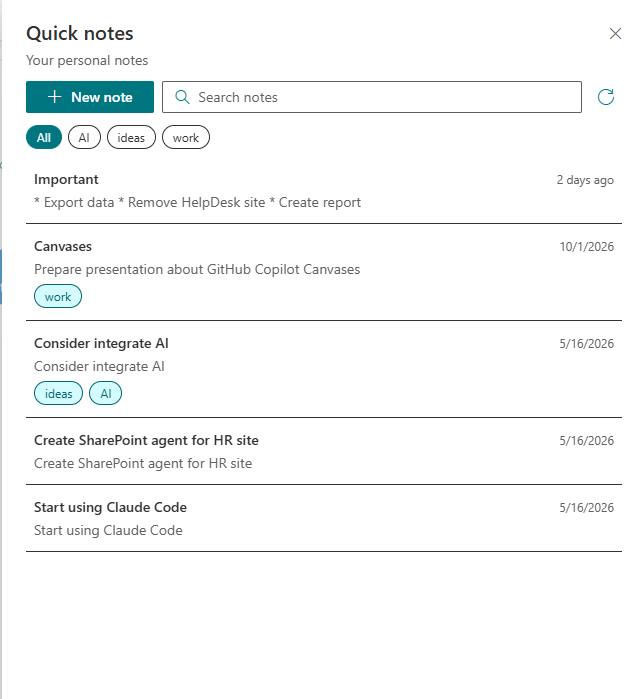
Open the SharePoint hosted workbench using the debug configuration generated for the Application Customizer. You should see a button in the page header that opens the Quick Notes panel.

Once the panel is open, you can list and search your notes, create new notes, edit existing notes, and save changes. You can also filter notes by category and view the last modified date of each note.
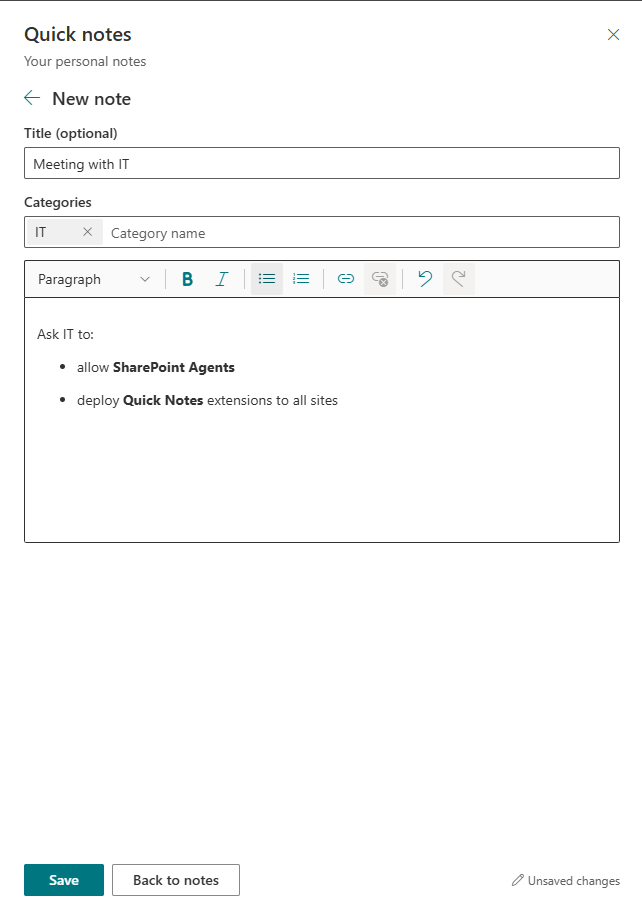
Create a new note by clicking the "New Note" button, entering a title and body, and clicking "Save". You can also edit an existing note by clicking on it in the list, making changes, and clicking "Save".
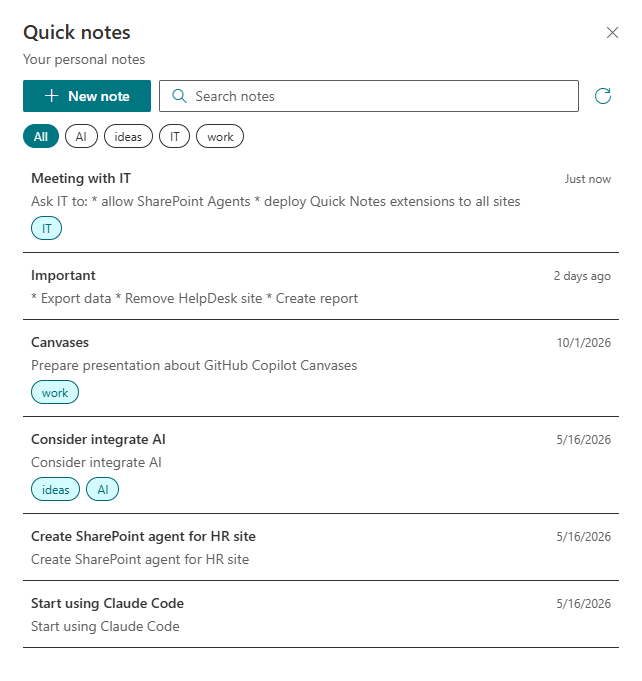
The new note appears in the list after it is saved.
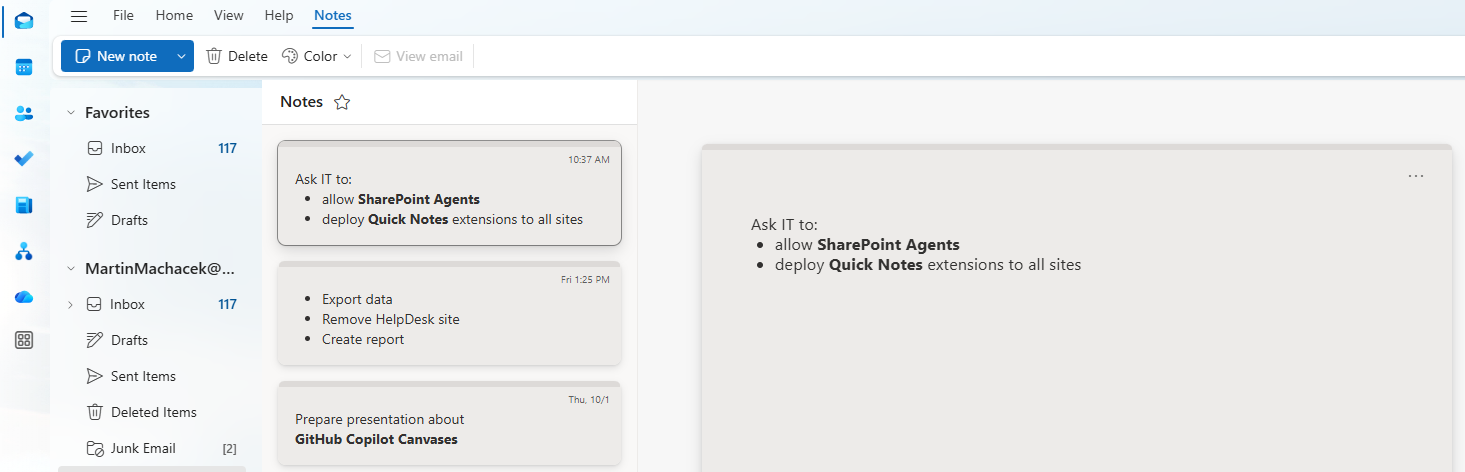
When you open Outlook, you should also see the new note in your Notes folder.
Conclusion
You now have an SPFx Application Customizer that brings personal Outlook notes directly into SharePoint. The solution uses MSGraphClientV3 for delegated Microsoft Graph access, Fluent UI for a SharePoint-native experience, and React state to support searching, category filtering, editing, pagination, conflict handling, and unsaved-change protection.
The most important production considerations are permission governance and resilience. Request only ShortNotes.ReadWrite, ensure an administrator approves it, preserve optimistic concurrency with the note changeKey, and keep sanitizing note HTML before rendering it. From here, you can extend the solution with note deletion, server-side filtering, telemetry, or automated tests while keeping the same service-and-component architecture.
You can find the complete source code for this solution in the SPFx Quick Notes GitHub repository.
