Mail folders
In one of my previous articles, I explained how to retrieve mail folders in a user's mailbox using the Microsoft Graph API. However, the endpoints used for enumerating mailbox folders are restricted to enumerate only a subset of all folders that exist.
For example, you can't retrieve folders like Tasks, Journal or any type of custom folder.
As part of the mailbox import and export APIs, Microsoft Graph provides a new endpoint to enumerate all folders in a user's mailbox.
Exchange settings
First of all, you need to retrieve the unique identifier of the user's primary mailbox by calling the GET beta/users/{id}/settings/exchange endpoint.
The response contains the primaryMailboxId property, which is the unique identifier of the user's primary mailbox.
List all mailbox folders
To list all mailbox folders in a user's mailbox, you need only two endpoints:
GET beta/admin/exchange/mailboxes/{mailboxId}/folders/{well-known_folder_name}
GET beta/admin/exchange/mailboxes/{mailboxId}/folders/{mailFolder_id}/childFolders
The both endpoints requires either the MailboxFolder.Read delegated or MailboxFolder.Read.All application permission. The first endpoint is used to get the root folder of the mailbox, and the second endpoint is used to get all child folders under the specified folder.
Example
Suppose you have created an Entra ID application and granted the permission MailboxFolder.Read to it. Now, using the Microsoft Graph .NET Beta SDK, you can list all mailbox folders in signed-in user's mailbox as follows:
var options = new InteractiveBrowserCredentialOptions
{
    ClientId = "{client_id}",
    TenantId = "{tenant_id}",
    RedirectUri = new Uri("http://localhost")
};
var credential = new InteractiveBrowserCredential(options);
var client = new GraphServiceClient(credential);

var exchangeSettings = await client.Me.Settings.Exchange.GetAsync();
var mailboxId = exchangeSettings.PrimaryMailboxId;

var rootFolder = await client.Admin.Exchange.Mailboxes[mailboxId].Folders["root"].GetAsync();
var indent = 0;
Console.WriteLine($"{new string(' ', indent)}> ROOT ({rootFolder.ChildFolderCount}, {rootFolder.TotalItemCount})");

await ListChildFolder(mailboxId, rootFolder.Id, client, indent + 2);

static async Task ListChildFolder(string mailboxId, string id, GraphServiceClient client, int indent)
{
    var childFolders = new List<MailboxFolder>();
    var url = $"https://graph.microsoft.com/beta/admin/exchange/mailboxes/{mailboxId}/folders/{id}/childFolders?includeHiddenFolders=true";
    var response = await client.Admin.Exchange.Mailboxes[mailboxId].Folders[id].ChildFolders.WithUrl(url).GetAsync();
    var pageIterator = PageIterator<MailboxFolder, MailboxFolderCollectionResponse>.CreatePageIterator(client, response, (folder) =>
    {
        childFolders.Add(folder);
        return true;
    });
    await pageIterator.IterateAsync();
    foreach (var childFolder in childFolders)
    {
        childFolder.AdditionalData.TryGetValue("wellKnownName", out var wellknownName);
        childFolder.AdditionalData.TryGetValue("isHidden", out var isHiddenRaw);
        _ = bool.TryParse(isHiddenRaw?.ToString(), out bool isHidden);
        Console.WriteLine($"{new string(' ', indent)}> {childFolder.DisplayName}{(wellknownName is null ? string.Empty : $" ({wellknownName})")} ({childFolder.ChildFolderCount}, {childFolder.TotalItemCount}) {childFolder.Type}{(isHidden ? " [hidden]" : string.Empty)}");
        await ListChildFolder(mailboxId, childFolder.Id, client, indent + 2);
    }
}
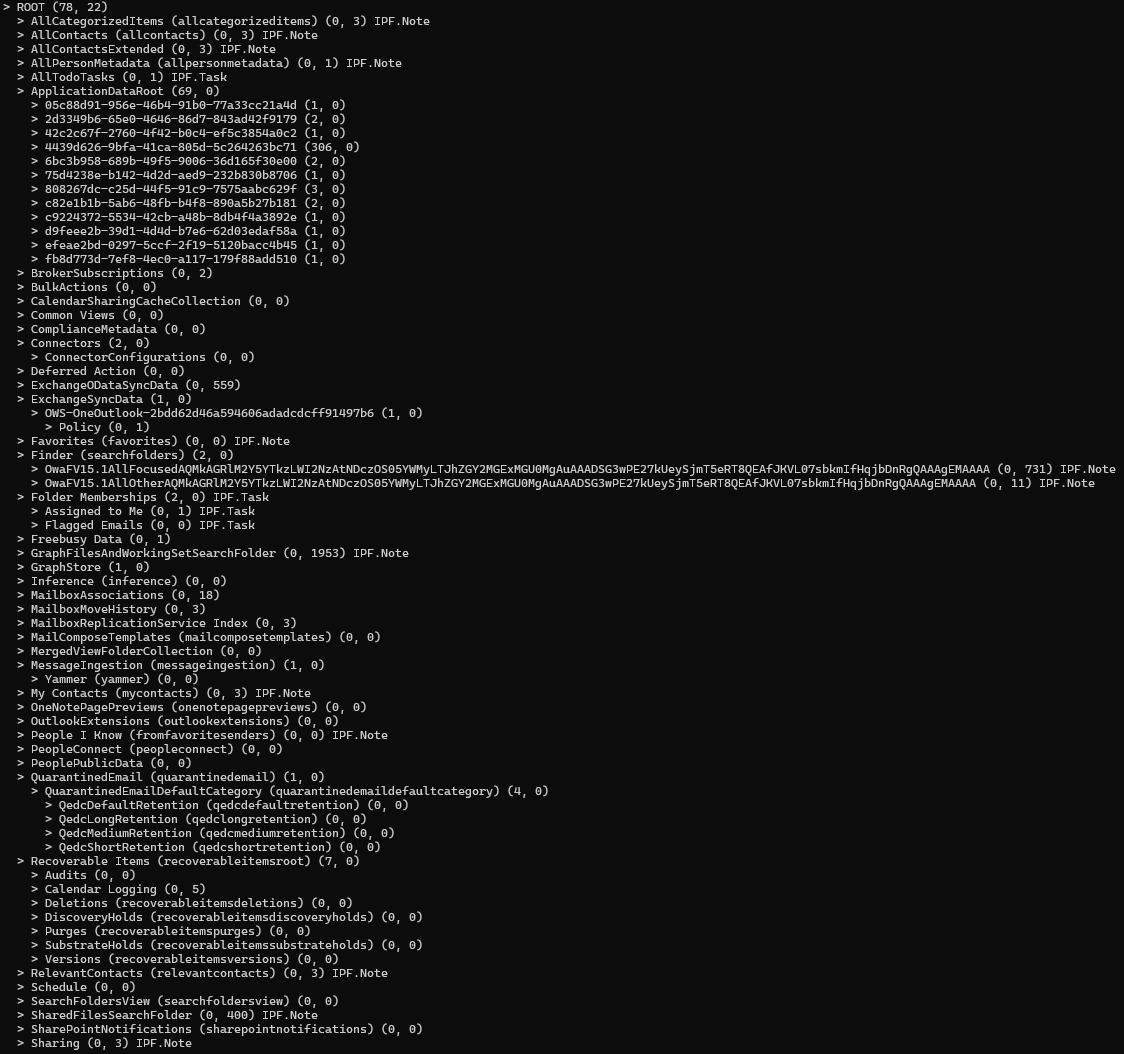
First, you need to get the id of the user's primary mailbox. Starting from the root folder, you can recursively call the ListChildFolder method to list all child folders in the mailbox.
In the ListChildFolder method, we use the includeHiddenFolders=true query parameter to include hidden folders in the response. This query parameter is not generated by the SDK, so I'm using the WithUrl method to specify the request URL directly.
The response type MailboxFolder doesn't contain the wellKnownName and isHidden properties, but they are returned in the additionalData property bag of the MailboxFolder object.
The result will be like this: