Introduction
Microsoft Graph has supported creating sharing links and granting access to additional recipients for a long time. Removing one person from a specific-people link was more difficult. Applications often had to delete the complete link, create a replacement, and grant access again to everyone who should keep it. It's something that every developer has had to deal with at some point, and it was a pain.
The new permission: revokeGrants action closes this gap. It removes selected recipients from a sharing link while leaving the link and its other recipients intact.
The sharing-link lifecycle
In Microsoft Graph, a sharing link isn't exposed as an independent top-level resource. It is represented by a permission resource on a driveItem. The permission contains a link facet with properties such as:
type, which determines whether the link provides view or edit accessscope, which determines who can use the linkwebUrl, which is the URL distributed to recipients
For a specific-people link, scope is users, and the permission's grantedToIdentitiesV2 collection represents the people who are allowed to use it.
The same link can therefore be identified in two different ways:
- by its location and permission ID: drive ID, item ID, and
permission.id - by its sharing URL, encoded for use with the
/sharesAPI
This explains why the grant and revoke operations have different-looking paths even though they modify the recipients of the same sharing link.
A specific-people link has three relevant lifecycle operations.
Create the link
The first request creates a link permission on the drive item:
POST /drives/{drive-id}/items/{item-id}/createLink

{
  "type": "view",
  "scope": "users"
}
The request intentionally doesn't contain recipients. createLink defines the link itself—its access level and scope—but it doesn't select the people who can use a users-scoped link.
The response is a permission resource similar to:
{
  "id": "2687a7e0-1b4d-4656-ae32-a4ea393321e1",
  "roles": [
    "read"
  ],
  "link": {
    "type": "view",
    "scope": "users",
    "webUrl": "https://contoso.sharepoint.com/..."
  },
  "sharedId": "u!aHR0cHM6Ly9jb250b3Nvss55d5dd22ddds9pbnQuY29t..S8_Y2xpZW50SWQ9MTA""
}
An application should retain both the permission ID and the returned sharing URL. They address the same link in different Microsoft Graph operations.
The sharedId property is the encoded sharing URL that can be used with the /shares API. It is created from link.webUrl by converting the URL to unpadded base64url format and prefixing it with u!.
Grant recipients access
Recipients are added in a separate request:
POST /shares/{sharedId}/permission/grant

{
  "recipients": [
    {
      "email": "adele@contoso.com"
    }
  ],
  "roles": [
    "read"
  ]
}
The grant action uses the sharing URL because it is part of the /shares API, which resolves shared content from a URL or sharing token.
Revoke recipients' access
The new operation completes the lifecycle by removing recipients from the link:
POST /drives/{drive-id}/items/{item-id}/permissions/{permission-id}/revokeGrants

{
  "grantees": [
    {
      "email": "adele@contoso.com"
    }
  ]
}
Microsoft Graph returns 200 OK and the updated permission resource. Its grantedToIdentitiesV2 collection contains the recipients who remain on the link.
Unlike grant, revokeGrants is an action on the permission in the item's permissions collection. It therefore identifies the link through the drive item and permission.id, rather than through the encoded sharing URL.
What exactly gets revoked?
The operation removes a recipient from one specific sharing link.
It works whether the recipient already redeemed the invitation or only received it. In both cases, the recipient loses the access provided by that link.
It does not remove access that the same person receives through:
- another sharing link
- a direct permission on the item
- membership in a Microsoft 365 group, security group, or SharePoint group
- inherited permissions from a parent folder or SharePoint site
This distinction is important for security and offboarding processes. A successful response means that the selected link no longer grants access. It doesn't prove that the user has no other path to the item.
Useful scenarios
Project and supplier collaboration
A project team can share a folder with selected employees, partners, or suppliers through one specific-people link. When one supplier finishes their work, the application can remove only that supplier while keeping the same link active for everybody else.
This avoids link rotation and prevents unnecessary disruption for the remaining participants.
Time-limited external access
An application can maintain its own expiration policy for individual recipients. For example, it can grant a consultant access for 30 days and later call revokeGrants for that consultant without changing the link used by the rest of the project.
The application should store the drive ID, item ID, permission ID, recipient, and intended expiration when it grants access.
Automated offboarding
When an employee or guest leaves, an offboarding workflow can search for specific-people links managed by the application and remove that identity from each link.
The workflow must still check direct and group-based access separately. The new action is a useful component of access cleanup, not a complete access-review engine.
Self-service sharing management
A document-management application can display the recipients of a link and allow its owner to remove one or more people. Previously, a "remove user" button could require replacing the link behind the scenes. It can now map directly to one Microsoft Graph operation.
Correcting an accidental share
If a user selects the wrong recipient, the application can revoke that recipient immediately without invalidating the URL already distributed to the intended audience.
Supported resources and endpoints
The action supports both driveItem and SharePoint listItem resources.
| Resource | Endpoint |
|---|---|
| Drive item | POST /drives/{drive-id}/items/{item-id}/permissions/{permission-id}/revokeGrants |
| Group drive item | POST /groups/{group-id}/drive/items/{item-id}/permissions/{permission-id}/revokeGrants |
| Signed-in user's drive item | POST /me/drive/items/{item-id}/permissions/{permission-id}/revokeGrants |
| Site drive item | POST /sites/{site-id}/drive/items/{item-id}/permissions/{permission-id}/revokeGrants |
| SharePoint list item | POST /sites/{site-id}/lists/{list-id}/items/{listItem-id}/driveItem/permissions/{permission-id}/revokeGrants |
| Another user's drive item | POST /users/{user-id}/drive/items/{item-id}/permissions/{permission-id}/revokeGrants |
Permissions
| Authentication | Least-privileged permission | Administrator consent |
|---|---|---|
| Delegated work or school account | Files.ReadWrite |
No |
| Application | Files.ReadWrite.All |
Yes |
| Delegated personal Microsoft account | Not supported | Not applicable |
The application permission deserves attention. Files.ReadWrite.All allows an application to read and write files in all site collections without a signed-in user. An unattended access-removal service therefore needs a broad permission even if it only uses this specialized action.
With delegated authentication, Microsoft Graph still evaluates the signed-in user's access to the item. The OAuth scope alone doesn't give the user access to files they couldn't otherwise manage.
Find the sharing-link permission
The request needs the permission ID representing the link. If the application created the link, the best option is to store the id returned by createLink.
For an existing item, permissions can be listed with:
GET /drives/{drive-id}/items/{item-id}/permissions
Link permissions contain a link facet. A link compatible with revokeGrants has:
{
  "id": "2687a7e0-1b4d-4656-ae32-a4ea393321e1",
  "roles": [
    "read"
  ],
  "grantedToIdentitiesV2": [
    {
      "user": {
        "id": "e6842c7e-33a1-4207-8b5a-2710922ac2b2",
        "displayName": "Megan Bowen"
      }
    }
  ],
  "link": {
    "type": "view",
    "scope": "users",
    "webUrl": "https://contoso.sharepoint.com/..."
  }
}
Only links whose link.scope is users are supported. Anonymous and organization-wide links don't track individual recipients, so Microsoft Graph returns 400 Bad Request if they are used with revokeGrants.
Listing permissions also has a visibility consideration. Item owners and co-owners can retrieve all sharing permissions. A non-owner caller might receive only the permissions that apply to that caller. Storing the permission ID when the application creates or manages the link is therefore more reliable than discovering it later.
Revoke a recipient with .NET
The official Microsoft Graph .NET SDK includes a generated RevokeGrants request builder and strongly typed models for the request and response.
Install the Microsoft Graph SDK and its Azure Identity authentication dependency:
dotnet add package Microsoft.Graph
dotnet add package Azure.Identity
Configure an application registration with the Files.ReadWrite delegated permission and grant administrator consent.
The app access personal drive and grants/revokes access for a specific file.
using Azure.Identity;
using Microsoft.Graph;
using Microsoft.Graph.Drives.Item.Items.Item.CreateLink;
using Microsoft.Graph.Drives.Item.Items.Item.Permissions.Item.RevokeGrants;
using Microsoft.Graph.Models;
using Microsoft.Graph.Models.ODataErrors;
using Microsoft.Graph.Shares.Item.Permission.Grant;
using System;
using System.Threading.Tasks;

namespace SharePointPermissions;

internal class Program
{
    static async Task Main(string[] args)
    {
        var tenantId = "<tenant-id>";
        var clientId = "<client-id>";
        var options = new InteractiveBrowserCredentialOptions
        {
            TenantId = tenantId,
            ClientId = clientId,
            LoginHint = "<login-hint>"
        };
        var credential = new InteractiveBrowserCredential(options);

        var graphClient = new GraphServiceClient(credential);

        try
        {
            var myDrive = await graphClient.Me.Drive.GetAsync();

            var driveId = myDrive.Id;
            var driveItem = await graphClient.Drives[driveId].Root.ItemWithPath("/Documents/Shared/Report_20261101.txt").GetAsync();
            var itemId = driveItem.Id;

            var permission = await graphClient.Drives[driveId].Items[itemId].CreateLink.PostAsync(new CreateLinkPostRequestBody
            {
                Type = "view",
                Scope = "users"
            });

            var encodedUrl = permission.ShareId;
            var grantResponse = await graphClient.Shares[encodedUrl].Permission.Grant.PostAsGrantPostResponseAsync(new GrantPostRequestBody
            {
                Recipients =
                [
                    new DriveRecipient
                {
                    Email = "HenriettaM@4wrvkx.onmicrosoft.com"
                },
                new DriveRecipient
                {
                    Email = "LidiaH@4wrvkx.onmicrosoft.com"
                }
                ]
            });

            foreach (var grantedPermission in grantResponse.Value)
            {
                Console.WriteLine(grantedPermission.Id);
            }
            var permissionId = grantResponse.Value[0].Id;

            var requestBody = new RevokeGrantsPostRequestBody
            {
                Grantees =
                [
                    new DriveRecipient
                    {
                        Email = "LidiaH@4wrvkx.onmicrosoft.com"
                    }
                ]
            };

            var updatedPermission = await graphClient
                .Drives[driveId]
                .Items[itemId]
                .Permissions[permissionId]
                .RevokeGrants
                .PostAsync(requestBody);

            foreach (var recipient in updatedPermission?.GrantedToIdentitiesV2 ?? [])
            {
                Console.WriteLine(
                    recipient.User?.DisplayName ??
                    recipient.SiteUser?.DisplayName);
            }
        }
        catch (ODataError ex)
        {
            Console.WriteLine($"Error: {ex.Message}");
        }
        catch (Exception ex)
        {
            Console.WriteLine($"Error: {ex.Message}");
        }
    }
}
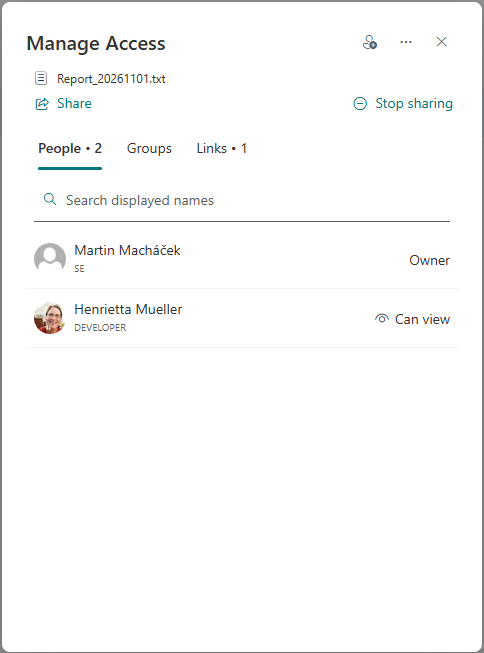
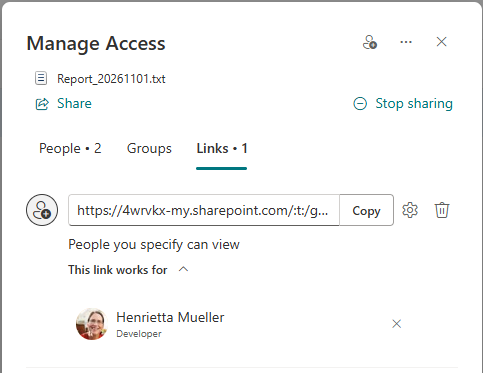
The app reads the drive item (personal), creates a link, grants two recipients view access, and then revokes one of them. The final output lists the remaining recipients.
The SDK serializes RevokeGrantsPostRequestBody, sends the request to the v1.0 endpoint, and deserializes the response into a Permission model. A failed Graph request is surfaced as an ODataError rather than requiring manual status-code processing.
Check directly on the SharePoint site to confirm that the revoked recipient no longer has access to the item.
Error handling and limitations
The permission must represent a sharing link
Passing the ID of a direct user permission returns 400 Bad Request. Use the Delete permission operation when the goal is to remove a direct grant.
Deleting a link permission and revoking a grant aren't equivalent:
DELETE /permissions/{permission-id}removes the complete sharing link.POST /permissions/{permission-id}/revokeGrantsremoves only the specified recipients from the link.
Only specific-people links are supported
The link must have scope: users. Anonymous links grant access to anyone who possesses the URL, and organization links grant access to authenticated members of the tenant. Neither model contains individual recipients that can be selectively removed.
Other access paths remain valid
After a successful response, use grantedToIdentitiesV2 to confirm the new state of the link. If the business requirement is to guarantee that a person has no access to the item, also evaluate direct, inherited, and group-based permissions.
Treat stored sharing URLs carefully
Sharing URLs contain access-related information and should be treated as sensitive data. Store the permission ID when possible and avoid logging complete sharing URLs.
Conclusion
The revokeGrants action adds a small but important missing operation to Microsoft Graph sharing management. Applications can now create a specific-people link, grant recipients access, and later remove selected recipients without deleting or replacing the link.
This is especially valuable for external collaboration, time-limited access, offboarding workflows, and self-service sharing applications. Existing participants keep using the same link while access for one person can be removed immediately.
The operation is intentionally narrow. It works only with specific-people links and only removes access provided by the selected link. Applications that need a complete access-removal guarantee must still inspect direct, inherited, and group-based permissions.
For more information, see: