Entra ID reports
The Microsoft Graph API provides access to a variety of reports that can help you monitor and analyze the usage of Microsoft Entra ID features in your tenant. These reports can provide insights into user activity, security events, and license utilization, among other things.
New reports are being added regularly and one of the latest additions is the Microsoft Entra ID P1 and P2 premium license utilization report. This report provides insight into how many premium licenses are entitled and how the associated premium features are being used in your tenant.
Entra ID P1/P2 license utilization report
This new report provides
- The number of Microsoft Entra ID P1 licenses entitled to the tenant
- The number of Microsoft Entra ID P2 licenses entitled to the tenant
- The total number of Microsoft Entra ID premium licenses (P1 + P2) entitled to the tenant
- The number of users who have used the Microsoft Entra Internet Access feature
- The number of users who have used the Microsoft Entra Internet Access for Microsoft 365 feature
- The number of users who have used the Conditional Access feature
- The number of guest users who have used the Conditional Access feature
- The number of users who have used the risk-based Conditional Access feature
- The number of guest users who have used the risk-based Conditional Access feature
- The number of users who have used the Microsoft Entra Private Access feature
In which scenarios should admins use this endpoint? Here are some examples:
- Cost optimization: Whether the org is paying for unused P2 licenses — downgrade candidates
- License right-sizing: Identify whether to buy more P1/P2 or reduce at renewal time
- Security posture: Small count of users using the Conditional Access feature relative to total users signals CA policies aren't widely applied — a security gap
- Feature adoption tracking: Measure rollout success of features like risk-based CA or Private Access after enablement campaigns
- Compliance reporting: Demonstrate to auditors that premium security features (MFA, RBAC, CA) are actively in use
- Internet/Private Access planning: Low number of users who have used the Microsoft Entra Internet/Private Access feature may indicate Global Secure Access isn't deployed yet
How to access the report
Only the user with either the Application Administrator, Cloud Application Administrator, Global Reader, Reports Reader, Security Administrator, Security Operator, or Security Reader role can access the Microsoft Entra ID P1/P2 license utilization report through the endpoint:
GET https://graph.microsoft.com/beta/reports/azureADPremiumLicenseInsight
The response will include data mentioned above, which can be used to analyze the utilization of Microsoft Entra ID P1 and P2 premium licenses in your tenant.
{
  "id": "00000000-0000-0000-0000-000000000000",
  "entitledP1LicenseCount": 100,
  "entitledP2LicenseCount": 50,
  "entitledTotalLicenseCount": 150,
  "p1FeatureUtilizations": {
    "conditionalAccess": {
      "userCount": 85
    },
    "conditionalAccessGuestUsers": {
      "userCount": 12
    }
  },
  "p2FeatureUtilizations": {
    "riskBasedConditionalAccess": {
      "userCount": 30
    },
    "riskBasedConditionalAccessGuestUsers": {
      "userCount": 5
    }
  },
  "privateAccessFeatureUtilizations": {
    "privateAccess": {
      "userCount": 20
    }
  },
  "internetAccessFeatureUtilizations": {
    "internetAccess": {
      "userCount": 45
    },
    "internetAccessM365": {
      "userCount": 38
    }
  }
}
Don't forget that the calling Entra ID application must have the Reports.Read.All permission to access this report.
Visualize the report data
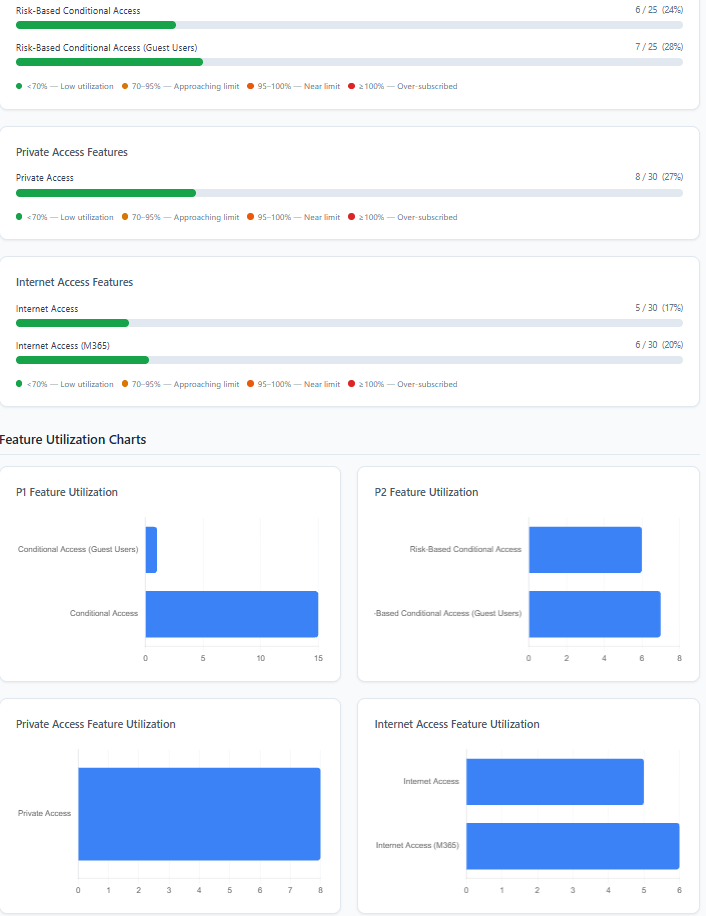
If you work with the PowerShell, you can use the Microsoft Graph PowerShell SDK to call the API and retrieve the report data. With a html template, you can visualize the data in a more user-friendly way. Check my GitHub repo for a sample PowerShell script and html template to get you started:
Conclusion
With the Microsoft Entra ID P1/P2 license utilization report, you can gain valuable insights into how your organization is utilizing its premium licenses and features. This information can help you make informed decisions about license management, security posture, and feature adoption in your tenant.
