Introduction
Microsoft Copilot can use files that you upload and can create files such as PowerPoint presentations or Word documents. In some Microsoft 365 Copilot experiences, these files are stored in special OneDrive folders named CopilotUploads and CopilotCreated.
This article explains how to access and clean up those files with Microsoft Graph.
Microsoft Graph documentation currently lists standard special folders such as
documents,photos, andapproot, but does not documentcopilotuploadsorcopilotcreatedas generally supported special-folder names. The endpoints described here are observed Copilot behavior and may change without notice. Test them in your tenant before relying on them in production.
Uploaded files
Files uploaded to Copilot may be stored in the CopilotUploads folder. The corresponding Microsoft Graph request is:
GET https://graph.microsoft.com/v1.0/me/drive/special/copilotuploads/children
Not every attachment is necessarily stored in OneDrive. For example, some images may be processed directly by Copilot. This behavior can depend on the Copilot experience and may change over time.
Created files
Files created by Copilot may be stored in the CopilotCreated folder. The corresponding request is:
GET https://graph.microsoft.com/v1.0/me/drive/special/copilotcreated/children
When you delete a Copilot chat, Copilot warns that files created or uploaded in that chat are not deleted automatically.
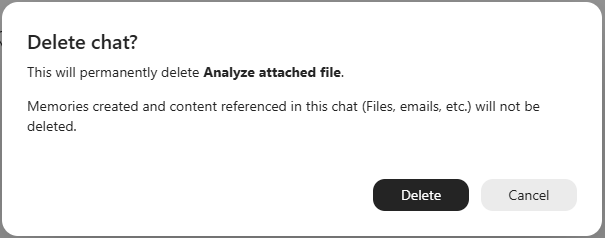
There is currently no supported Microsoft Graph relationship that identifies the Copilot chat associated with a file in either folder. Therefore, cleanup code should use conservative rules, such as file age.
Automating cleanup of Copilot files
This example targets Microsoft 365 Copilot with a work or school account and uses delegated permissions.
Prerequisites and permissions
Create an app registration in Microsoft Entra ID and grant:
User.ReadFiles.ReadWrite
User.Read allows the application to sign in and read the signed-in user's profile. Files.ReadWrite is required to read and delete files in OneDrive.
For a console application, use the Microsoft.Graph and Azure.Identity NuGet packages. Azure.Identity can provide an interactive or device-code credential, while Microsoft.Graph provides the Graph SDK client.
Application-only permissions are not supported for the documented special-folder API. The user must sign in, and the application operates on that user's OneDrive.
Finding files to remove
The following method returns files whose last modification time is older than the specified lifetime:
public async Task<List<string>> GetFilesToRemoveAsync(string specialFolder, TimeSpan lifetime)
{
    var drive = await _graphClient.Me.Drive.GetAsync();
    var uploadsFolder = await _graphClient.Drives[drive.Id].Special[specialFolder].GetAsync();
    var children = await _graphClient.Drives[drive.Id].Items[uploadsFolder.Id].Children.GetAsync();

    var filesToRemove = new List<string>();

    var pageIterator = PageIterator<DriveItem, DriveItemCollectionResponse>.CreatePageIterator(_graphClient, children, (item) =>
        {
            if (item.File != null && item.LastModifiedDateTime.HasValue && DateTimeOffset.UtcNow - item.LastModifiedDateTime.Value >= lifetime)
            {
                filesToRemove.Add(item.Id);
            }
            return true;
        });

    await pageIterator.IterateAsync();
    return filesToRemove;
}
The Microsoft Graph SDK first retrieves the user's default drive, then resolves the special-folder alias, and finally lists the folder's children:
The equivalent REST requests are:
GET https://graph.microsoft.com/v1.0/me/drive
GET https://graph.microsoft.com/v1.0/me/drive/special/{specialFolder}
GET https://graph.microsoft.com/v1.0/me/drive/items/{specialFolderId}/children
I'm using a PageIterator to iterate through all files in the special folder. This is important because the Microsoft Graph API returns results in pages, and you need to handle pagination to get all items.
Deleting files
A POST request permanently delete a OneDrive item.
POST https://graph.microsoft.com/v1.0/me/drive/items/{item-id}/permanentDelete
Microsoft Graph JSON batching allows multiple requests in one HTTP call. A batch can contain up to 20 requests. BatchRequestContentCollection in current Microsoft Graph SDK versions can split larger collections into multiple batches automatically.
public async Task RemoveFilesAsync(List<string> fileIds)
{
    var drive = await _graphClient.Me.Drive.GetAsync();
    var batchRequestContent = new BatchRequestContentCollection(_graphClient);
    foreach (var fileId in fileIds)
    {
        var request = _graphClient.Drives[drive.Id].Items[fileId].PermanentDelete.ToPostRequestInformation();
        await batchRequestContent.AddBatchRequestStepAsync(request, fileId);
    }
    var batchResponseContent = await _graphClient.Batch.PostAsync(batchRequestContent);
    foreach (var fileId in fileIds)
    {
        var response = await batchResponseContent.GetResponseByIdAsync(fileId);
        if (response.IsSuccessStatusCode)
        {
            Console.WriteLine($"File {fileId} removed successfully.");
        }
        else
        {
            Console.WriteLine($"Failed to remove file {fileId}. Status code: {response.StatusCode}");
        }
    }
}
The status of each individual request must be checked. A successful response from the $batch endpoint does not mean that every request inside the batch succeeded.
Conclusion
Copilot-created and Copilot-uploaded files may be accessible through the copilotcreated and copilotuploads OneDrive special-folder aliases:
GET https://graph.microsoft.com/v1.0/me/drive/special/copilotuploads/children
GET https://graph.microsoft.com/v1.0/me/drive/special/copilotcreated/children
These Copilot-specific aliases are not currently listed among the generally documented Microsoft Graph special-folder names, so applications should treat them as implementation-dependent. When they are available, Microsoft Graph can be used to list the files and permanently remove old items from OneDrive.
